UGREEN iDX6011 Pro · eGPU dock · Radeon RX 7900 XTX
Local AI on a NAS
Chat in the browser, an agent and images, computed on a UGREEN iDX6011 Pro with a Radeon RX 7900 XTX in the dock. The language model has 125 billion parameters, the NAS keeps serving photos, media and backups, and the data stays at home. Everything here was measured on my machine. Scripts, configs and raw data are on GitHub.
OWN BUILDNo Strata release runs here but my fork strata-xtx 0.2.22-xtx3: the same quality, and it reads prompts 1.3 to 2.0 times as fast as the release, even after Strata 0.2.21 loosened its prompt-reading brake. Chapter 5 · GitHub
[ MEASURED ] as of 26 Nov 2026 · own build strata-xtx 0.2.22-xtx3 on Strata 0.2.22 · UGOS Pro 1.21.1 · estimates are marked as such
[ IN PARALLEL ] photos, video, file shares and UPS monitoring of UGOS keep running, even with the model loaded
What runs here
The NAS with the card in the dock runs what you would otherwise take from a cloud service: chat, agent, images and coding, also reachable through a messenger and from your own programs. The computing happens at home.
Open WebUI
Like a chat service from the cloud, except that the answers come from your own card: one account per person, history, file upload, web search through an own SearXNG.
Hermes Agent
An agent you reach in the browser or through a messenger, that uses its own tools and runs tasks on a schedule, with up to 256K tokens of context. Rules in the system prompt and a small checker keep it from making things up. What it learns from conversations is kept by Hindsight, also at home.
Signal
Write to the agent from your phone like to a contact, also when away from home. I recommend and prefer Signal, because messages there are end-to-end encrypted. I have also tested Telegram and Discord successfully.
ComfyUI
"Make a picture of …" in the chat or the messenger: the switch unloads the language model and loads a picture model onto the same card. Both at once do not fit into 24 GB.
OpenCode 2
A coding agent that reads and changes files and runs commands. It runs as a service in the home network, with a password, and is used from the browser or from the terminal of any computer; a session keeps running when the laptop is closed. It talks to the same address as the chat, and you pick the model in the session. With the local models the code stays at home.
n8n
Fixed workflows on a schedule or by webhook: query, sort out, summarise, forward. Where a step needs language, n8n asks the same Flash-Next 125B through llama-swap. Hermes Agent finds, starts and builds the workflows through MCP; every run can be traced. The agent decides, n8n carries it out.
API in the OpenAI format
Any program that can talk to a cloud service in the OpenAI format can be pointed at the address in the home network instead: scripts, editor extensions, automations. No account with a provider is needed.
Only these things leave the house. The search queries: the chat searches through its own SearXNG, which asks the search engines through a VPN; they see the VPN provider's address, not your own line. The agent searches through a search service with an account, such as Exa, because it gives an agent much better results; this service sees the queries, and a VPN hides nothing there. The pages the agent reads: the web reader Crawl4AI fetches them, through a VPN as well; only if that fails does a cloud service step in, within limits, and then it sees the address. Mail: the Proton Bridge fetches Proton Mail encrypted and decrypts it only at home, where the local model reads it; the agent sends its own mail from its own mailbox, all signed with PGP, to me also encrypted. The messages through the messenger service, end-to-end encrypted with Signal; with Telegram and Discord the service can read along. On top of that come the targeted queries of the n8n workflows. Everything else, including every uploaded document, stays on your own machines.
The NAS stays a NAS
Even with the model loaded, everything the iDX was bought for keeps running: photos, video and file shares. The card in the dock takes nothing away from them, because they have a graphics unit of their own.
The iDX keeps doing what it was bought for, with the services UGOS brings along: Photos for the photo library, Video for the media library, file shares over SMB and UPS monitoring. Docker comes from UGOS too; chat, search and agent run in it. The built-in Arc iGPU stays free for transcoding and photo recognition, the card in the dock only runs language and picture models.
While the model was writing, a 17.7 GB file came off the NAS at 1,174 MB/s (1,175 MB/s without a model; the receiver sat on the same network with 10 Gbit/s, which the transfer nearly filled). Transcoding 4K to 1080p on the Arc iGPU dropped from 290 to 156–245 frames per second, still 5 times as fast as playback. The model's decode speed did not change (measured on 19 Nov 2026 on my own build; with the uncensored version one of the two requests affected was 5 % slower). Not measured: SMB.
The price is memory: with the 125B model loaded, 3.7 to 7.5 GiB of the 62 GiB stay available, depending on the version (measured on 26 Nov 2026). A second large service does not fit next to it.
A bigger, more exact quant of the same model, with part of its experts streamed from the NVMe by Strata, does not pay off (measured on 20 and 21 Nov 2026). UD-IQ4_XS (93.7 GB) writes at 44 to 46 instead of 61 tokens per second and passes as many tasks of the task set (95 and 96 against 96 and 96 of 102). UD-Q4_K_XL (111 GB) reads 21 to 23 GB from the NVMe for every answer of 900 tokens and writes at 24 tokens per second. With either, only 2.3 GiB of RAM stay available. Measurements
A bigger model, Tencent Hy4-Flash with 220 billion parameters from Strata 0.2.18, runs here, but eight times slower (measured on 21 and 22 Nov 2026): it writes at 7.0 to 7.5 instead of about 61 tokens per second and reads a long prompt at 414 instead of 3,094 tokens per second. The CPU computes 36 GB of experts from RAM, and every answer of 900 tokens reads about 160 GB from the NVMe. With the split from Strata's setup, memory runs full and it writes at only 0.3 to 0.6 tokens per second; the fix is HY4_RAM_BUDGET_GB, reported as issue #6556. Strata 0.2.20 fixes it: with exactly the setup's split it writes at 12.7 to 13.4 tokens per second, without swapping and with at least 9.5 GiB of RAM free (re-test), still a fifth of Flash-Next's speed. Hy4-Flash is censored and takes no control vector; my own build does not change its speed. Quality not measured. Measurements
An uncensored version of the same model from OrcaRouter (IQ3_XXS, 85 GB) does not replace my variant with control vector (measured on 23 Nov 2026): it writes 5 to 10 % slower, needs a RAM budget beside the NAS services, and passes 89 instead of 97 of 102 tasks, losing mostly on tool calls and safety. Measurements
Inkling 2 Mini from Thinking Machines, part of Strata since 0.2.19 with an engine of its own, is either fast or reaches long prompts here, not both (measured on 22 and 23 Nov 2026): with all experts on the card it writes at 71 to 73 tokens per second but fails at about 100,000 tokens for lack of video memory; with the new split of 0.2.20 it reads long prompts but writes at only 9.5 tokens per second. On top, 93 to 94 instead of 97 of 102 tasks and weak German. Measurements
Is the card in the dock worth it?
UGREEN ships the iDX with an AI console that loads its own model onto the built-in Arc iGPU. The same file, three paths:
| Path | Decode tok/s | Prompt tok/s | NAS and dock | per 1,000 tokens |
|---|---|---|---|---|
| as shipped: UGOS server on the Arc iGPU | 10.3 | 559 | 78 W | 2.1 Wh |
| CPU only, llama.cpp | 15.5 | 79 | 97 W | 1.7 Wh |
| RX 7900 XTX in the dock, llama.cpp Vulkan | 114 | 2,977 | 288 W | 0.7 Wh |
On the card the built-in model writes 11 times faster than as shipped and needs 0.7 instead of 2.1 Wh per 1,000 tokens. The CPU alone out-writes the iGPU server but reads a prompt about seven times more slowly. "As shipped" is the server UGOS starts by itself after the download; I measured it through its Unix socket. The AI console's second runtime is a CUDA build and does not start with an AMD card.
And the quality? The same tasks for both models
The small model writes almost twice as fast but thinks much longer: 2.7 times as many tokens for the same tasks, and in nine tasks the reasoning budget was used up before an answer came. In return it leaves the RAM of the NAS free. If you mainly want a NAS and chat now and then, the small model on the card serves you well; for an agent and long texts the big one pays off.
A 125B model on 24 GB
Qwen3.8-Flash-Next is a Mixture-of-Experts model: only a few experts run per token. Strata keeps the frequently used ones in VRAM and the rest in the iDX's fast RAM. It runs in three versions: uncensored in daily use, the original for the first measurement and as the fallback, and a smaller quantization only for comparison.
  UGREEN iDX6011 Pro      UGOS Pro 1.21 (Debian 12 base, kernel 6.18.15)
  │                       64 GB LPDDR5X · hybrid CPU (P- and E-cores) · 2× 10 GbE · 2× Thunderbolt 4
  │                       built-in Intel Arc iGPU → video transcoding, photo recognition
  │
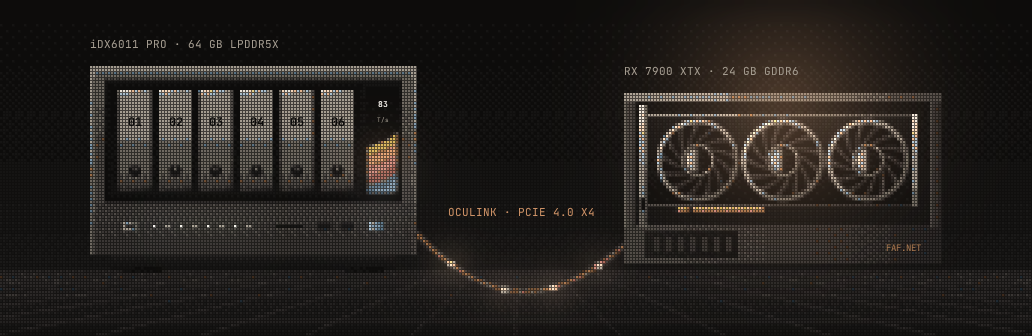
  │  OCuLink, PCIe 4.0 x4 (host port caps at x4 / 16 GT/s ≈ 7.9 GB/s)
  ▼
  UGREEN LinkStation eGPU dock   own 850 W power supply
  └─ AMD Radeon RX 7900 XTX      24 GB VRAM, Navi 31 / gfx1100, x16 inside the dock
       └─ Strata (ROCm 7.10 from AMD's TheRock wheels), one model at a time via llama-swap
└─ Qwen3.8-Flash-Next 125B MoE · IQ3_XXS (ISTA-DASLab) · int8 KV cache · MTP draft head · 256kDecode speed stays at 59 to 64 tokens per second between 1K and 248K tokens of context. From 16K on my own build reads 2,200 to 3,500 tokens per second, the unchanged release about 1,300, over a PCIe link with only four lanes. What the own build is and how it was checked is in chapter 5.
Decode speed depends on the text, which is why this page shows different numbers: the draft head (MTP) proposes several tokens at once and is right more often on predictable text. Long answers come at 72 tokens per second with the original and at 69 with the uncensored version in daily use; Strata's own benchmark gives 83 in its agent part and 79 in its chat part, and a little less after a very long prompt. The “up to 80” in the page header is the agent run; long answers come in below that.
For comparison, a dense 70B model (Llama 3.3, Q4) on the same card: 2.7 tokens per second, because every token reads all weights and half of them sit behind the CPU.
Six models on the same card
Smaller models that fit entirely into video memory run on the card as well. Two dense models write at half the speed of the 125B model and do not pass more tasks. UGREEN's bundled Qwen 3.5 writes fastest but has the weakest German and passes the fewest tasks. Only the versions of the 125B model are both fast and good at German; the uncensored one leads in German. The numbers in this chart are from Strata 0.2.12; on 0.2.14 the 125B model passes 98 instead of 96 of 102 tasks. One or two tasks flip between two runs of the same release, so 96 and 98 mean equal.
And against a model in the cloud?
Waiting times in everyday use
In a running conversation the answer comes at once, because the model keeps the conversation so far. It reads a long text once; follow-up questions on it are fast again. After 30 minutes without a request the model is unloaded and loaded again next time. For shared use, pick one model for everyone: if two people alternate between two models, the card reloads every time (20 s).
strata-xtx: Strata for an RX 7900 XTX
Since 18 Nov 2026 no Strata release runs here any more but a build of my own with one small change: on this card it turns on by itself what doubles the reading of long prompts. Since 26 Nov 2026, 7:15 am, it runs as 0.2.22-xtx3 on Strata 0.2.22; since 0.2.21 the release catches up in reading, my own build stays 1.3 to 2.0 times as fast.
Where Strata 0.2.19 gets slower, and how 0.2.19-xtx3 fixes it
With 0.2.19 Strata brings defaults of its own for RDNA3 cards, among them bigger prompt chunks. The same new rule, however, turns on a RAM guard: it takes the big chunks only when 6 GiB of RAM stay available afterwards. On a NAS with 64 GB in which the 125B model takes most of it, that is never the case, so 0.2.19 reads in small chunks here. As shipped, the release reads a 58K prompt at 1,430 tokens per second, my previous patch unchanged on top of it at 1,497 instead of 3,206, only half as fast. 0.2.19-xtx3 also sets Strata's own switch that skips the guard on this card and reads 3,433 tokens per second, 7 % more than before; the variant with control vector reads 128K at 3,516 instead of 3,292. Available RAM stayed as high as on 0.2.18, and 90 minutes of continuous load ran without an error.
What it does differently
Strata's engine ships switches for prompt reading that are off on this card generation because several of them change the rounding. My build carries a table of 28 of them in the code and turns them on when exactly one discrete RX 7900 XTX or XT is visible under Linux; the engine newly sets 27 of them, one is already on in the release. No prompt-reading switch is left in the run config. Whatever you set yourself is never overwritten, and STRATA_GFX1100_DEFAULTS=0 turns everything off. The change is about 215 lines in five files and lives, with build instructions, in a repository of its own: faf-net/strata-xtx. It is an unofficial fork, not a Strata release.
Steel blue is the unchanged release, amber my own build, both on Strata 0.2.22, measured alternately on 26 Nov 2026 with Strata's own benchmark, card in my quiet setting. Over the whole depth the original reads 2,165 tokens per second at 16K, 3,444 at 65K and 3,322 at 248K; the variant with control vector that my agent works with reads 2,389, 3,425 and 3,308. 250,000 tokens are read in 79 seconds; the release takes 104. In decode my own build is 6 % (chat) and 5 % (agent) faster in the same runs.
Checked before it went into use
Every version goes through the same chain, with both models. Quality: on 0.2.22 my task set gives 97 of 102 with the original and 95 with the variant with control vector; across the builds on 0.2.15 to 0.2.22 the original lands between 95 and 98, the variant between 95 and 98. On the unchanged 0.2.16 release it was the same; some tasks the model passes sometimes and sometimes not. Long prompts: the hidden number was found every time up to 250,000 tokens. Endurance: 90 minutes of mixed requests, on 0.2.22 most recently 1,316 of them, none failed. Self-rescue: if the engine reports non-finite values and Strata's own retry does not help, the server restarts it once without the table and carries on in the slower, exact mode. The request that triggered it ends with an error, the following ones are answered; shown for both models with Strata's built-in fault injection, on 0.2.18 and 0.2.19 again with the variant with control vector.
The intermediate step: the same switches set by hand
Before my own build existed I set the switches by hand: a set of 28 that the unchanged engine knows, measured on 17 and 18 Nov 2026 on the 0.2.14 release: steel blue is Strata as shipped, amber the same engine with the switches in the run config. That was the intermediate step. After that my own build carried 27 switches itself: of the 28, one became a fixed rule for the chunk size, one brought nothing and was dropped, one was added; with 0.2.19 Strata's own chunk switch came in as the 28th. Of the roughly 10 % in decode from that measurement my own build shows 7 to 8 % when alternating with the release, less in the other series.
The price and the limits
The answers are not bit for bit the same as without the table, because the rounding changes; in my checks this does not show in quality. While reading, the card draws 25 to 30 W more (chapter 8). None of the switches is guaranteed by Strata: a release may rename or drop one, and the engine silently ignores an unknown name. I have not measured the RX 7900 XT, a card in a full PCIe x16 slot, another model or quant, or Windows.
When a new Strata release arrives
So there is a fixed procedure: first measure the unchanged release against the previous one, then apply the patch to the new source (it aborts if an anchor is missing), build, and run the chain above; only then do I switch over and re-measure the charts on this page. For 0.2.16 that meant: a new folder layout, a new build script, an adapted self-rescue test, and in the end the same figures as on 0.2.15. 0.2.17 added a larger prompt reading buffer; on 0.2.18 the patch applied unchanged. On 0.2.19 it applied too but read only half as fast; only the comparison against the build in use showed it, and only 0.2.19-xtx3 with Strata's own chunk switch is faster than before again. On 0.2.20 the same patch applied unchanged; on top I re-measured the ceiling of the CPU share for short prompts (3,072 to 6,144 tokens): 4,096 stays, because smaller ceilings slow 4K prompts by a third and bigger ones bring nothing at 16K. Unchanged on 0.2.21 too; there I also measured an agent's follow-up requests: a lower floor for the streamed walk, which halves the wait on a smaller card with a smaller model, makes it up to twice as long here. The night of measurements with the 28 switches in detail · Patch and build instructions
Keeping the agent from making things up
A local model knows less than one from the cloud and does not like to admit it. The agent showed two weaknesses: it made up answers about things that do not exist, and it announced steps it has no tool for. I measured both first and then brought them down.
What belongs in the system prompt
Against making things up · my agent has run with this rule since 16 Nov 2026
Beantworte, was du weißt. Kennst du eine Sache, einen Namen oder ein Werkzeug gar nicht, sag das, statt etwas zu erfinden. Das gilt besonders für Befehle, Optionen und Ortsnamen: Kennst du sie nicht sicher, sag das, auch wenn sie plausibel klingen.
in English: Answer what you know. If you do not know a thing, a name or a tool at all, say so instead of making something up. This applies especially to commands, options and place names: if you are not sure you know them, say so, even if they sound plausible.
made-up things recognised: 104 of 120 · made-up command options: 17 of 24 · real questions right: 91 of 150, without a rule 95 (within the noise)

In addition, for agents with tools
Nenne nur Werkzeuge und Parameter, die du wirklich hast. Gibt es keins, sag: „Dafür habe ich kein Werkzeug.“
in English: Name only tools and parameters you really have. If there is none, say: "I have no tool for that."
wrong calls: 15 → 10 of 60 · justified calls: 41 → 32 of 50

Strict rule · instead, when a wrong answer costs more than a missing one
Wenn du etwas nicht sicher weißt, sage ausdrücklich „Weiß ich nicht“. Das ist eine richtige Antwort. Erfinde keine Fakten und keine Handlungen. Raten ist schlechter als Nichtwissen.
in English: If you are not sure of something, say explicitly "I don't know". That is a correct answer. Do not invent facts or actions. Guessing is worse than not knowing.
wrong answers: 58 → 30 of 150 · right ones: 90 → 84 · "I don't know": 36 times
The first sentence of the rule cuts the making up of things that sound foreign by about three quarters and costs no right answers. On command options and place names that sound plausible it fails on its own: the model recognised only 7 of 24 made-up options. The addition brings that back (17 of 24) without costing anything on ordinary questions. Rules with a fixed "I don't know" recognise a little more (21 of 24) but cost about every fifth right answer. How I arrived at these sentences is in the three measurements below.
Measure first: 16 questions per area, half of them made up
The probe asks about eight real and eight made-up things in each of five areas: towns, command options, theorems, books and parameters of the agent's own tools. Three rounds, five models, each without and with rules: 2,400 answers. I re-read the doubtful verdicts; an "I don't know" that still offers a guess counts as made up.
Four rules in the system prompt clearly reduce making things up on these questions
Without the rules the five models recognise only 17 to 60 % of the made-up things and invent the rest, most often the state of a made-up town and options that do not exist. With the rules it is 88 to 99 %. They still answer real things as correctly as before (117 to 120 of 120): the rules do not make them overcautious. A different model did not help; two dense models on the same card invented just as much and wrote at half the speed.
Counter-check with other questions: a short sentence helps, but not everywhere
The four rules name exactly the kinds of things my probe asks about. Hence the counter-check with public question sets I did not write: 150 things that do not exist, 150 hard and 150 medium real questions, 150 agent cases with a tool list, each with six versions of the system prompt.
The short sentence ("basic rule" in the chart) lowers the making up of non-existent things from 20 to 6 of 150 and leaves the answers to real questions as they are. The strict rule says "I don't know" four times as often for answers that were wrong without a rule as for right ones, but costs some of the right ones. The four rules of the first probe cost twice as many right answers and gain hardly anything. The tool sentence lowers wrong calls but also suppresses justified ones. The uncensored model behaves like the original on every point.
Follow-up: commands and places need a sentence of their own
The public question sets contain no command options. So my first probe ran again for the uncensored model, with three versions: the short sentence alone, the short sentence with the addition on commands, options and place names, and the four rules of the first probe. Of 24 made-up command options the model recognised 7, 17 and 21, of 24 made-up place names 12, 19 and 22, of all 120 made-up things 86, 104 and 113. On the 150 medium real questions 91 stayed right with the addition (95 without a rule, 76 with the four rules). One run each at temperature 0.7, every unrecognised answer read by hand.
For judgement, three rounds are not enough
The same three operating situations, asked ten times instead of three. A hard instruction ("if the number deviates, stop") is followed in 10 of 10 answers. Where the model has to weigh things itself, it looks worse than after three rounds: when a job aborts at night, it invents capabilities in 6 of 10 answers, such as "I'm pausing the collection". If you test an agent, ask every situation more often than is comfortable.
Hence three layers instead of one
The rules in the prompt catch made-up facts, but not announced steps. For those, the agent's tools now return a ready sentence and the allowed next steps, so the numbers come from code. And a small checker without a language model reads every answer: it flags unsupported numbers, announced steps without a tool and unknown tool names. In the agent answers it caught all six made-up abort answers, with no false alarm on the other tasks. It does not see made-up facts in plain words: of 269 made-up probe answers it would have flagged none.
Limits: the probe asks single questions without a conversation, with a short system prompt. How strongly the rules work inside a long agent prompt is not measured. The counter-check ran once per question and was judged by the same model; differences of a few answers mean nothing there. All measurements in detail · the checker plugin · the probe script
Uncensored: a model that refuses nothing
Chat and agent can use any model on this setup; it is chosen per conversation or in the agent's settings. One of them is uncensored. It is the same 125B model with its refusals removed: it answers whatever it is asked, including what the original model declines. There is no filter left, and it does not lecture. Technically a steering vector removes the direction along which the model refuses (abliteration); the weights stay the same.
Why: out of the box the model refuses or waters down a lot that is nobody's business on your own machine. An assistant at home should answer, not educate. Of 15 tasks that models often refuse, the uncensored one answers all, the original 11. Tasks, German and speed stay the same (measured on Strata 0.2.12; one or two tasks flip from run to run).
Does it make up more? Not measurably. Of 150 things that do not exist it treated 25 as real, the original 20; with a short rule in the system prompt it was 5 and 6. An agent needs the rules and the checker with either model.
What you take on: the model no longer distinguishes between a question that was refused wrongly and one the original declines for good reason. It answers both. The only line left is drawn by the person asking, and the responsibility lies with whoever runs it. It does not belong in front of children or in a service strangers can reach. How it works, the config and all numbers
What does it cost in power?
$ python3 messen/betrieb.py strom
PHASE        TOTAL     CARD   0 W                     600 W   SPEED
idle          64 W     16 W   ███░░░░░░░░░░░░░░░░░░░░░░░░░
loaded        59 W     20 W   ███░░░░░░░░░░░░░░░░░░░░░░░░░
writing      378 W    234 W   ██████████████████░░░░░░░░░░   about 65 tokens/s
reading      399 W    288 W   ███████████████████░░░░░░░░░   3,301 tokens/s
→ 1.5 Wh per 1,000 written tokens (1.2 Wh above idle)
█ card alone  █ NAS and dock without the card
That is 1.5 Wh per 1,000 written tokens (1.2 Wh above idle). A loaded, idle model costs nothing measurable compared with the empty card. The measurement is taken at the UPS, which feeds only the NAS and the dock; idle, both together draw 64 W.
While reading, the card draws 288 W and reads 3,301 tokens per second: 0.034 Wh per 1,000 tokens read. The faster reading of my own build costs the card 25 to 30 W more than the unchanged release (measured alternately on 18 Nov 2026), but only about half the energy per token read, because the prompt is through in half the time. At the wall, power while reading varies more from run to run than between the two builds. Measured on 26 Nov 2026 on my own build.
Does it hold across releases?
Every Strata release since 0.2.0-beta was measured here against the one before it, with the identical configuration. Up to 0.2.13 nothing got slower. 0.2.14 reads prompts of 16K and 32K about 15 % faster and writes equally fast. 0.2.15 only brings a new control program. 0.2.16, tested on 19 Nov 2026, has its own engine code and a new folder layout; on this card it changes nothing about speed: alternating directly with 0.2.15 it writes 61 against 60 tokens per second. 0.2.17, tested on 21 Nov 2026, likewise: alternating with 0.2.16 it writes 62 against 62 tokens per second, and it reads equally fast. 0.2.18, tested on 22 Nov 2026, adds a second model, Hy4-Flash; for Flash-Next it changes nothing: alternating with 0.2.17 it writes 61 against 62 tokens per second. 0.2.19, tested the same day, is a little faster as a release (decode 65 against 62 tokens per second, reading 8 to 9 % more), but holds back its own bigger prompt chunks behind a RAM guard: the open red diamond shows where my previous patch would have landed on it. 0.2.20, tested on 23 Nov 2026, changes nothing for Flash-Next (decode 65 against 66 tokens per second), the guard is still there. 0.2.21, tested on 24 Nov 2026, loosens the guard: the release reads 16K 32 % and 32K 50 % faster than 0.2.20 and a prompt of 250,000 tokens in 103 instead of 175 seconds. 0.2.22, tested on 25 Nov 2026, changes nothing in the engine for one card (decode 66 against 65 tokens per second), but gives requests without sampling the model card's sampling again; my run configs therefore set temperature 0, so the agent answers as before. A slow first acceptance test came from memory pressure on the NAS, not from the build. Until 18 Nov 2026 the release itself ran here. Since then my own build runs, since 26 Nov 2026 as 0.2.22-xtx3; the diamonds in the chart show it on 0.2.16 to 0.2.22, each measured in the same runs alternating with the release. Every release in detail
Rebuild it in six steps
The basic setup needs only the NAS, the dock and the card, and runs entirely in the home network. If you only want the chat, stop after step 3.
Set up the card
UGOS Pro from 1.21 ships the firmware for the card. In the control panel under "Dedicated graphics card" leave the mode at "NAS". Switch the dock on first, then the NAS: OCuLink is only detected at boot.
Pitfalls on UGOSStart the model server
Strata loads the 125B model, llama-swap offers it under one address in the home network and unloads it after 30 minutes idle. Unloading is not about saving power, it is a protection: if the card drops off the bus with a model loaded, a kernel bug restarts the NAS.
Launch configsAdd the chat
Open WebUI in a container, with one account per person. It talks to llama-swap's address, nothing else needs setting.
Compose fileAdd web search
SearXNG in the same stack. The chat searches the web through it, with no search account and no key. In my setup SearXNG queries the search engines through a VPN.
Compose fileAdd the agent
Hermes Agent with the local model: set the context to 256K, give the reasoning a token budget and put the rules against making things up from chapter 6 into the system prompt.
Rules and checkerAdd OpenCode 2
OpenCode 2 as a service in the home network (
Example configopencode servewith a password) or on your own computer, with llama-swap as a provider in the OpenAI format. Set the same model for session titles as for the work, otherwise the switch reloads for every title.
The bottleneck is memory. With the 125B model loaded, 3.7 to 7.5 GiB of the 64 GB stay free, depending on the version; that is enough for chat, search and agent, but not for a second large service. If you need more room, pick a model that fits entirely on the card.
From outside, the simplest way in is the VPN of your own router; I use my own gateway with login on a small rented server. Nothing is openly exposed to the internet; every way in asks for a login. Images with ComfyUI · Benchmark scripts and raw data · Building Strata yourself